
In this article, you will learn how to define a random selection (pooling) from a list of questions in questionnaires. This allows you to store multiple questions on a single topic and have learners answer only a limited number of them, for example, only 12 out of 20 stored questions.
How to create a questionnaire with a pooling function
- Add a test questionnaire or a scored questionnaire in the content area, depending on whether the questions should be scored or unscored.
- In the editor, open the Questions tab on the right-hand side.
- Use Add question(s) to choose existing questions, or create the corresponding questions from scratch.
- Once you have created all required questions, open the Questionnaire tab.
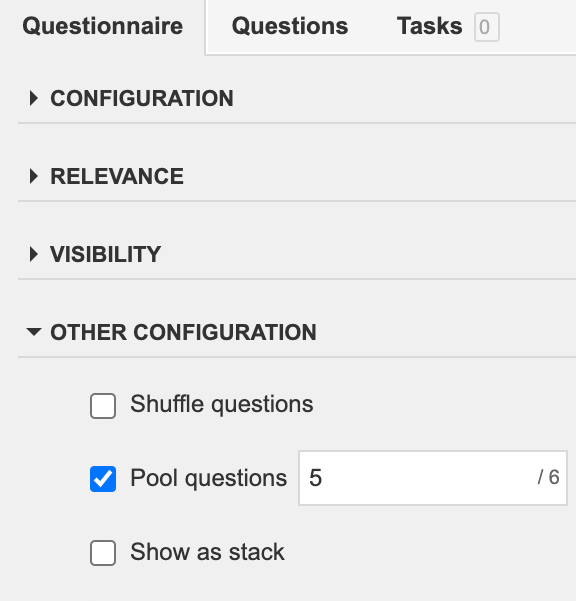
- In the Questionnaire tab, enable Pool questions in the Other Configuration section. In the adjacent field, define how many of the questions stored for the questionnaire should be displayed to learners.
Notes on using the pooling function
- Pooling is available for questions within a questionnaire, not across multiple individual questions.
- Pooling is not available for pretests.
- If learners are allowed to retake a questionnaire, the same questions will be displayed upon repetition; there will be no new random selection.
- If certain questions must always be displayed, you can define these questions as mandatory questions. For more information, see the article on mandatory questions.
You can find more information on configuring quizzes in Knowledgeworker Create in the article Quiz Questions in Knowledgeworker Create.